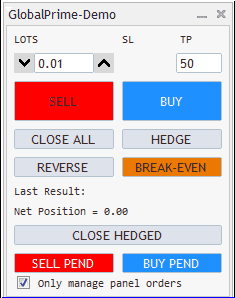
Some years back I made a trade panel which had some unique features.
(you will find a new version in post 8 below and there are various other versions in the attachments section of this thread)
Hedge Trade-panel | Forex Factory
I’m still using it but I wanted to make something different so I decided to make a new trade panel and I'm sharing it here.
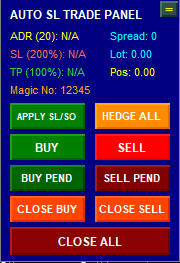
The main difference is that the new panel is calculating SL and TP and distance to stop orders and limit orders using the daily range of the currency pair,
plus that it is moveable to anywhere on the chart. (to move it double click on the = button and drag and drop the button anywhere on the chart, then the panel will follow)
The EA will automatically place a SL Or a stop order Or it will auto hedge to protect our main trade.
These options are available through input "SL TYPE" . If we do a partial trade closure and the size of our main trade is reduced then the EA will close the initial stop order and open a new one at the reduced lot size.
There is an input for switching between SL mode and Stop Order mode. The button APPLY SL/TP is not really needed but it is there for extra protection in case the EA is slow at opening a new stop order or applying the SL.
The CLOSE BUY and CLOSE SELL buttons will only close the market orders and not the protecting stop orders but if a market stop order closes then its paired stop order will close automatically.
The lot size can be fixed or it can be calulated automatically using risk % and equity. I use Risk% because I don't have to keep adjusting my trade size as my account equity fluctuates. The lot size is displayed in the info window (Lot 0.23). The open positions are also displayed there (Pos 0.00)but please note that these are net positions (Buy orders + sell orders cancel each other out so we see our net exposure)There is no hedging button because I would never use it but I kept the OrderCloseBy method (Read the pdf, its useful when trading large size) and I linked it to the CLOSE ALL button (there is an input for enabling this function). I find this feature particularly useful when I have a basket of open trades (which might take a while to close) and I want to preserve profit. Plus during news events or high volatility when 1 second we are +$5K and the next second +$2K or even 0.
I'm also attaching a PDF with an AI generated example on how the function OrderCloseby will work with 10 open trades and explains the benefits
EDIT Jan 28 2026
Updated Panel Version 2.82 (See Post 7 below)
- Added Diagnostics input
- Added Spread to the info panel
- Added 3 types of trailing stop, the default selection is B but I prefer the ADR type (selection C)
- Added hedging option.
If we press the HEDGE ALL button the EA will place a hedging order of matching trade size for each open MARKET ORDER and will delete the protecting stop orders.
If we later decide to close the hedge order, the EA will place a fresh STOP ORDER
SL TRADE PANEL V2.84
The Magic number is now shown in the info panel and the pip readings are now compensated for Gold and Indices.
I have added the AUTO HEDGE feature of V34 to this trading panel and it is enabled/disabled through the SL type input
It is option 3= selection: SL_TYPE_AUTO_HEDGE
There is also a 4th SL option in this input which allows us to disable all SL
AUTO HEDGING in V2.84
When Auto Hedging is enabled the EA is using magic Number shift, so once the 2 trades are hedged they are no longer managed by the EA because it will change its magic number ( Unless you change the EA input and select" Manage own Trades=false)
If you close 1 of the 2 hedged trades and change the input SL type to " SL_TYPE_STOP_ORDER" the EA will place a STOP ORDER to protect the open trade.
If you close 1 of the 2 hedged trades and change the input SL type to " SL_TYPE_NORMAL" the EA will place a STOP LOSS to protect the open trade.
If you close 1 of the 2 hedged trades and change the input SL type to " SL_TYPE_NONE" the EA will not place a SL or a STOP ORDER, the remaining open trade stays unprotected
EDIT 9 Feb 2026
Added Updated Hedge Panel 34D (changed Gold pip calculation).
EDIT 10 Feb 2026
Added Updated Hedge Panel V34E and SL Trade Panel V2.84E (Fixed Auto hedging bug for Gold and set the input" Manage own trades"=false).